


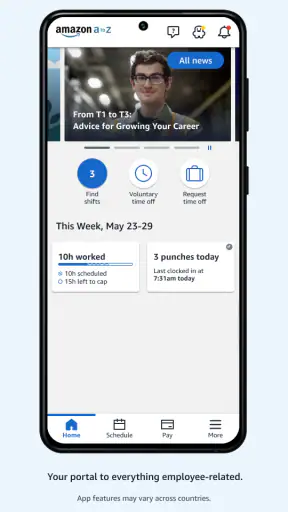
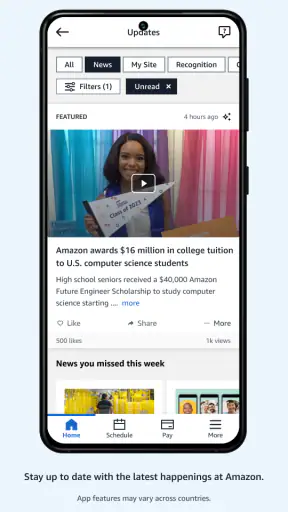
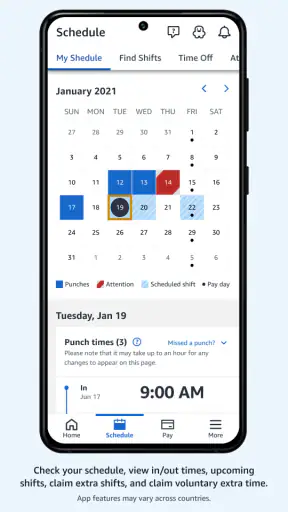
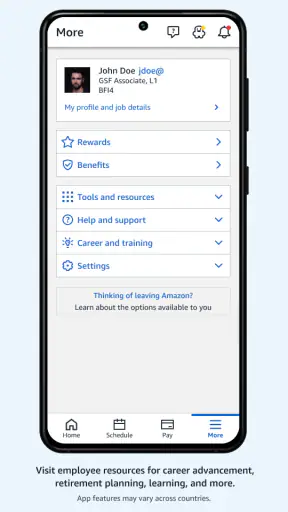
Working at Amazon can involve a surprising amount of personal administration alongside the actual job: checking work information, keeping track of schedules, reviewing time details, and staying aware of updates that affect everyday routines. Amazon A to Z is designed as the employee-facing place for that work-life management. I see it less as a general productivity app and more as a central dashboard for people who already work at Amazon and need a practical way to stay connected to employment-related information.
That distinction matters. This is not an app I would recommend to someone looking for a universal planner, a shift marketplace, or a business tool for managing a team. Its usefulness depends heavily on your relationship with Amazon. When that relationship exists, the app can reduce the need to remember several separate tasks or search through unrelated channels. When it does not, there is little reason to install it.
Building a work routine around one employee hub
Before using the app, it is easy to handle work-life details in a scattered way. A person might rely on memory for upcoming shifts, keep screenshots of important information, search old messages, or switch between workplace systems whenever a question comes up. That approach can work for a while, but it becomes fragile when schedules change or when several small administrative tasks arrive at once.
The practical value of this app is that it gives those tasks a shared starting point. Instead of treating every work-related detail as a separate reminder, I would use the app as the first place to check what needs attention. That creates a simple habit: open the employee app, review the relevant information, and then add only the genuinely important items to my own calendar or notes.
This is a healthier workflow than trying to make the app do everything. A work portal is good at presenting employer-specific information, while a personal calendar is usually better for travel time, childcare, appointments, meals, and rest. Keeping those roles separate prevents the employee app from becoming a cluttered substitute for a complete personal planning system.
For example, imagine finishing a workday and wanting to prepare for the next one. I would check the app for the information that affects work, then use my normal calendar to block the surrounding routine: commute, sleep, a school pickup, or a personal appointment. The useful insight is that the app becomes the source of work facts, while the calendar becomes the place where those facts meet real life.
What the app is meant to handle
Amazon A to Z belongs to the business category, but it is not a general business suite in the way a document editor, invoicing tool, or customer relationship platform is. Its purpose is employee self-service. The store summary describes it as a place to manage your work-life at Amazon, and that is the right way to understand its scope.
The developer is Amazon Mobile LLC, and the app is free to install. It is intended for everyone from an age-rating perspective, although practical access is naturally tied to being an Amazon employee or otherwise having an appropriate workplace account. That difference between an open age label and a restricted work purpose is worth remembering: a family member can download it, but downloading alone does not make it useful.
The app has been available since August 29, 2018, and its current version is 6.0.1200.0. It supports devices running Android 7.0 or later. Those details make it approachable for people who keep an older Android phone, though device compatibility is only one part of the experience. A supported operating system does not guarantee that every workplace action will be available to every employee, because access can depend on the person’s role and account.
Capturing information without creating another inbox
My preferred way to use an employee portal is to review it at deliberate moments instead of opening it constantly. A quick check before work, after a shift, or when preparing the week is more sustainable than repeatedly refreshing it throughout the day. The goal is not to turn the app into a source of anxiety; it is to make important work information easier to find when I actually need it.
When something requires action, I would capture the next step outside the app in a form that fits the task. A schedule detail belongs in a calendar. A question for a manager belongs in a short note. A recurring preparation task belongs on a checklist. This small separation is one of the most useful ways to avoid losing important context. The app provides the workplace information, but my personal system decides how that information affects the rest of the day.
A second helpful habit is to avoid saving screenshots as the default record of everything. Screenshots can be convenient, but they become difficult to search and can quickly become outdated when information changes. I would use them only when I need a temporary visual reference, then return to the app for the current version of the detail. That approach reduces the risk of acting on an old image.
Another non-obvious trade-off is that centralization does not automatically mean clarity. A single employee app can be easier than several disconnected tools, but it can still require careful reading. I would pause before treating every visible item as an urgent task. Some information is simply there for reference, while other items may require a response or follow-up. Turning each notification or update into an immediate interruption would undermine the productivity benefit.
Turning occasional checks into a repeatable routine
The strongest use case is not a one-time look at the app; it is a small routine that matches the rhythm of the job. For a person with a consistent schedule, a weekly review may be enough to connect upcoming work with personal commitments. For someone whose hours change often, a shorter review before planning the next day may be more appropriate.
I would begin by choosing one reliable review point. Sunday evening can work for people who plan the whole week, while the end of a workday may be better for people who need to prepare for the next shift. During that review, I would check the work information available in the app, transfer only the necessary commitments to my personal calendar, and identify anything that needs clarification before it becomes urgent.
The routine should stay lightweight. If it takes too long, it becomes another chore that is easy to skip. A good system also includes a stopping rule: once the information has been checked and the next actions have been recorded, close the app. This prevents a simple administrative check from turning into aimless browsing or repeated worry about whether something has changed again.
For workers balancing variable hours with family responsibilities, this routine can be especially useful. A parent might review work information before arranging childcare, then place the confirmed commitments alongside school events and appointments. The app does not replace communication with family or supervisors, but it gives the worker a more dependable starting point for those conversations.
For a newer employee, I would use the app as part of an orientation routine rather than trying to memorize every workplace process immediately. Check the available information, note unfamiliar terms, and write down specific questions. That is more effective than repeatedly searching at random because it turns uncertainty into a short list that can be addressed one item at a time.
Where the experience can become frustrating
The biggest limitation is also the app’s defining boundary: it is built around Amazon employment. If you are not an Amazon worker, it is not a useful general-purpose organizer. Even if you are employed by Amazon, the information and actions that matter to you may vary by role, location, and account access. I would therefore avoid assuming that another employee’s experience will exactly match mine.
That account dependence also changes how I would troubleshoot a problem. If the app opens but a particular work detail is missing, the issue may not be something a normal phone setting can fix. Reinstalling an app or clearing space may help with a technical problem, but it will not resolve every access or workplace-account question. In those situations, the sensible next step is to use the appropriate internal support route rather than repeatedly changing phone settings.
Older devices can introduce another point of friction. The minimum Android requirement is 7.0, so anyone using an earlier release cannot rely on this version being available for that phone. A compatible operating system is important, but storage, general device condition, and reliable connectivity can still affect how comfortable the app feels during a busy day.
I also would not treat it as a replacement for a personal calendar, task manager, or secure document system. Those tools are better for combining work with medical appointments, travel, household responsibilities, and long-term goals. The employee app has a narrower job. Trying to force it into a complete life-management system would create unnecessary duplication and make it harder to see what actually needs attention.
There is a useful comparison here with the usual alternatives. Paper notes are flexible but can become outdated. Screenshots are quick but hard to organize. A personal calendar is excellent for planning time but may not contain the latest employer-specific information. Messages can preserve conversation but are poor as a single source of structured work details. Amazon A to Z sits closest to the official work-information side of that group, so I would pair it with, rather than replace, the tools I already use for personal planning.
Small practices that make it more dependable
First, I would check the app before making a commitment that depends on work timing, rather than relying on an old note. This is particularly important when arranging transportation or childcare. The extra moment spent checking the current information is usually less costly than rebuilding a personal plan around a mistaken assumption.
Second, I would keep a short “questions to resolve” note separate from the app. If something looks unclear, recording the exact question prevents repeated checking without progress. It also makes a conversation with the right workplace contact more precise. This is a simple but valuable distinction: checking information and resolving uncertainty are different tasks.
Third, I would avoid using the app as a memory test. If a work detail affects sleep, travel, family care, or another important responsibility, I would transfer it into the personal system that governs that part of my life. The app remains the reference point, while the reminder lives where I am most likely to see it at the right time.
Fourth, I would review the routine after a couple of weeks and remove steps that do not help. Sustainable productivity is not about checking more often; it is about checking at the right time and turning the result into a clear next action. That principle is especially relevant here because an employee portal can feel important enough to revisit repeatedly even when nothing needs to be done.
Who will benefit most from adopting it
This app makes the most sense for Amazon employees who want a central place for work-life administration and who are tired of relying on scattered notes or memory. It is particularly suitable for people whose schedules or work details require regular attention, as well as workers who prefer checking an official employee tool before updating their personal plans.
It can also help someone who is building a more disciplined routine around changing work demands. The app does not create that routine automatically, but it gives the routine a consistent first step. For me, that is its strongest productivity contribution: it reduces the number of places I need to search before deciding what belongs on my calendar or task list.
I would be more cautious about recommending it to someone who expects a polished all-purpose organizer. It is not the right choice for managing a small company, coordinating a team outside Amazon, tracking personal finances, or planning projects unrelated to employment. A standard calendar or task manager will be more useful for those needs, and a workplace communication channel may be better for questions that require a human answer.
The app has a 4.1 average from around 98 thousand ratings, with over 5 million installs and around 16 thousand written reviews. Those figures suggest that it is widely used and generally useful to its intended audience, but they should not be mistaken for a promise that every employee will have the same experience. The more important question is whether its employee-focused role matches the way you currently manage work information.
My final take on the work-life workflow
I would recommend Amazon A to Z to an eligible Amazon employee who wants a dependable starting point for checking work-related information. Its value comes from fitting into a broader system: the app holds the workplace side, while a calendar, notes, and personal routines handle the rest of life. Used that way, it can replace scattered checking with a calmer and more repeatable process.
I would not install it expecting a universal productivity solution. Its narrow purpose is a strength when you need Amazon-specific employee management, but a limitation when you need flexible planning or detailed collaboration. The best result comes from checking it intentionally, recording only the next actions that matter, and keeping personal commitments in the tools designed for them.
For me, the deciding factor is that balance. The app works best as an official work-information anchor, not as your entire productivity system. If that is exactly the gap you are trying to fill, its free availability, broad device support from Android 7.0 onward, and focused employee role make it a sensible addition to a daily routine. If you are looking for something broader, a regular calendar and task manager will serve you better.


